


Picrew PFP & OC Maker
4.41.44K Reviews
App Specs
- Version
- 2.0.5
- Updated On
- License
- Free
- Downloads
- 1,000,000+
- Developer
- TETRACHROMA INC.
- Categories
- Art & Design
- Platform
- Android, iOS
Screenshots
 Analysis by AppCompare
When I want a new profile picture but don’t want to draw one from scratch, I like the idea of building a character from ready-made art pieces. Picrew PFP & OC Maker is aimed at that kind of quick, playful self-expression: you choose a creator’s design and shape a portrait or original character around it. It is an art-and-design app from TETRACHROMA INC., and its appeal is less about professional illustration tools than about making a personal image without needing drawing experience.
What free access means in practice
The app is free to install, so you can try the basic experience without paying upfront. It also offers in-app purchases, with listed items ranging from $1.99 to $39.99. I’d treat those as optional spending rather than assume every creator or design requires a purchase: check what an item unlocks in the app before paying, and decide whether that specific addition is worth it to you. The free entry point makes experimenting easy, while the purchase range is broad enough that a quick look at the details matters.
Its audience is broad, but the content rating is Teen, which is worth keeping in mind if you’re choosing an app for a younger user. The release date was July 11, 2024, and version 1.2.11 is the current version. It has a 4.3 average from around 35,000 ratings, with over 1 million installs. Those figures suggest that many people have tried it, though they can’t tell you whether its particular art styles suit your taste.
Making a character, one choice at a time
First things first, what’s this app all about? Picrew PFP & OC Maker is a digital haven for artists and non-artists alike. It lets you create unique avatars or OCs using a vast library of graphical elements. The app is user-friendly, making it perfect for anyone who wants to bring their imagination to life without needing professional design skills.
Getting Started: The Interface
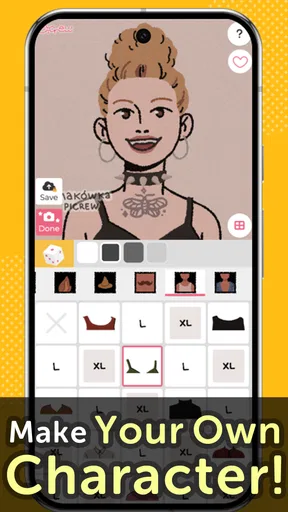
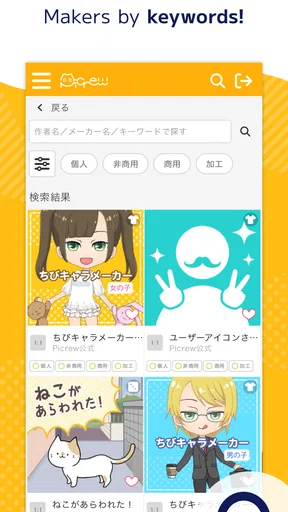
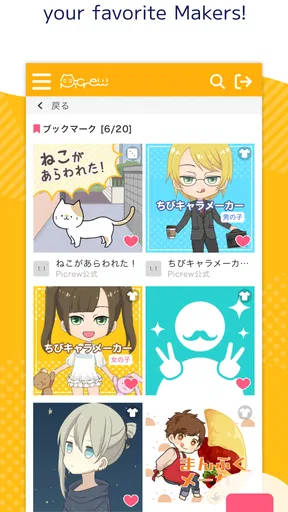
Upon launching the app, you’re greeted with a clean and straightforward interface. I was pleasantly surprised by how intuitive it is. The main screen showcases various creators’ templates that you can use as a starting point. Just tap on any template that catches your eye, and you’re ready to start customizing. It’s as easy as pie, and honestly, I spent hours just exploring the available options.
That template-first approach is useful when you have a vague idea rather than a finished design in mind. Instead of facing a blank canvas, I can begin with a particular mood or visual style, then see what the available choices let me build. A practical trick is to browse a few templates before committing to one: the first appealing thumbnail may not offer the details or tone you need. For a character meant to represent a specific person or story, picking a compatible starting style can save time and make the finished image feel more coherent.
Customization Galore!
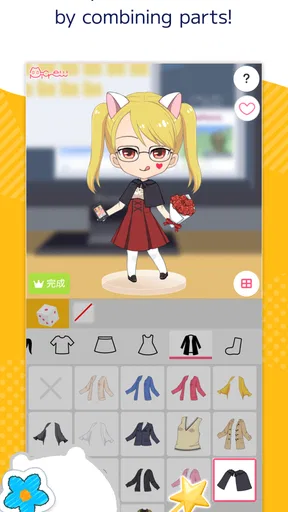
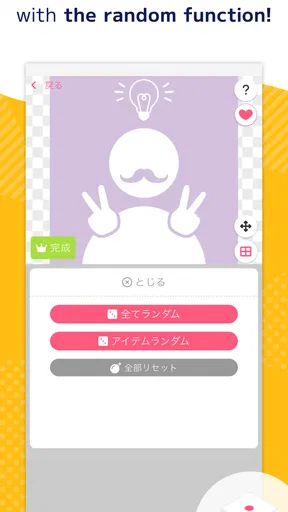
Now, this is where the magic happens. The customization options in Picrew are seemingly endless. You can tweak almost every aspect of your avatar, from hairstyles and facial features to clothing and accessories. The layering feature is particularly impressive, allowing you to build your character piece by piece. It’s like playing dress-up, but way cooler. Whether you’re into fantasy, sci-fi, or just want a quirky avatar, Picrew has got you covered.
Worth Reading Before You Choose

Flipboard Shows What News Apps Must Do Beyond the Feed

Switching to Android Auto Means Rethinking Your Driving Routine

Google Calendar Makes a Crowded Week Easier to Manage

Ludo King Makes the Most of the Minutes Between Plans

Baby Panda World Brings Quick Play to Modern Phones, but Its Game Library Feels Busy

ESPN’s Live Game View Makes Following Close Games Easier
Even with plenty of choices, customization is still bounded by the template you choose. That is part of the charm: the creator’s visual rules give the portrait a consistent look. It is also a real trade-off. If you have a very particular image in mind, you may not find the exact combination of features, clothes, or accessories you want. I’d approach each template as a focused set of possibilities, not as a general-purpose editor where every part can be freely drawn or reshaped.
For a more deliberate result, I’d settle the character’s broad identity before changing small details. Decide whether the portrait should feel cheerful, mysterious, or understated, then choose options that support that impression. This keeps a long session from turning into random switching between accessories. If the app offers several suitable templates, compare their overall style first; a close match in linework and mood often matters more than finding one isolated feature.
Community Creations
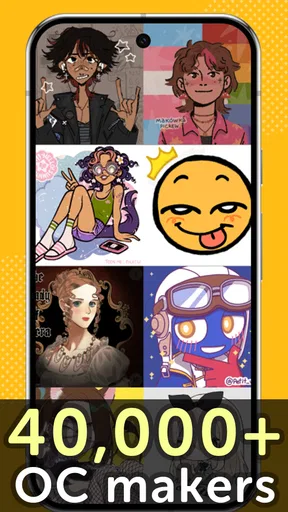
One of the standout features of Picrew is its community-driven content. The app lets users create and share their own templates, which means there’s always something new to explore. I found myself constantly amazed at the creativity of the Picrew community. From intricate steampunk designs to adorable chibi characters, the diversity is truly inspiring. Plus, it’s a great way to support fellow creators by using and sharing their work.
Community-made templates make the experience feel different from a conventional avatar editor built around one uniform set of parts. The variety comes from individual creative approaches, so browsing is part of the activity rather than a chore before the “real” editing begins. The flip side is that a template’s options and visual direction depend on its creator. If you need a tightly controlled design workflow or consistent assets for a larger project, a dedicated illustration program is a better fit than relying on a collection of distinct community styles.
A useful everyday workflow is to make a small set of versions for different purposes: one expressive portrait for a chat profile, and a calmer one for a work-adjacent account, for example. I would save each image with a clear name on my device so I can tell them apart later. Before sharing a character that represents someone else, I’d also check that person is comfortable with the image being used publicly. A simple creative tool can make an avatar quickly, but deciding where and how to use it is still up to you.
Sharing Your Masterpiece
Once you’ve crafted the perfect avatar or OC, Picrew makes it super easy to share your creation. You can save your image directly to your device or share it on social media with just a few taps. The app’s sharing capabilities are seamless, and it’s always fun to see how your friends react to your new digital persona. Whether it’s for your social media profile or just for fun, Picrew ensures you can flaunt your creativity effortlessly.
Saving to your device is the more flexible choice if you are not ready to post immediately. It lets you review the crop and decide later which account, if any, should use the image. For a profile picture, I’d check that the face remains readable when shown small; a detailed outfit or decorative elements may be lost in a circular thumbnail. A character can still be enjoyable as a full image even if it does not work as a tiny icon, so I would judge those uses separately rather than discard a design that looks good at full size.
Where it fits among creative apps
Compared with a general drawing app, this is a much quicker route to a finished character portrait, especially if you don’t draw. A drawing program gives you more control over composition and individual marks, but it also asks for more time and skill. Compared with a simple avatar generator, the creator-led template approach offers more variation in style, although it means the experience can feel less uniform from one design to another. I’d choose this app for playful portraits and character exploration, and choose a drawing tool when I need precise control, custom backgrounds, or artwork that must match a specific brief.
It can also be a handy starting point for an original character rather than the final artwork. I might use a portrait to settle on a hairstyle, outfit mood, or broad color direction, then keep those choices as a reference while writing or sketching elsewhere. That is a useful middle ground: the app helps turn a loose idea into a visible character, without pretending to replace a full illustration workflow. If you need editable layers or a production-ready asset for a design project, make sure the available save options suit that purpose before building your process around it.
Who is likely to enjoy it?
I think it suits people who want a distinctive profile image, enjoy trying different art styles, or create characters for stories and role-playing. It also works well for a low-pressure creative break: you can make one portrait during a spare moment without learning a complicated tool. If you prefer to draw every detail yourself, need exact control over anatomy and composition, or want a consistent branded set of graphics, you may find the template-based approach limiting. The app is best when flexibility within a creator’s design is enough, rather than when you need unrestricted authorship.
A realistic use case is a friend group planning matching profile pictures for a shared chat. Each person can browse for a style they like, make a character that feels individual, and save the result for the group. The images need not be identical to feel connected, and the process gives everyone something to discuss. For a more personal use, I’d make an OC portrait to help keep a character’s look in mind while drafting a story. In both cases, the value is the quick visual idea, not a promise of professional artwork.
Why I Love Picrew
Let me tell you, Picrew PFP & OC Maker has a special place on my phone. Not only is it a fantastic way to kill time, but it also serves as a creative outlet. The app encourages self-expression and lets you experiment with different styles without any pressure. I love how it brings people together, fostering a sense of community among creators and users alike. Plus, it’s a great way to discover new art styles and trends.
My main reservation is that “easy to use” does not mean every result will feel completely personal. The template sets the available visual vocabulary, and browsing can take longer than expected if you are searching for a very specific look. There is also a difference between trying the free app and deciding to spend on an in-app item: I would only pay when I understand what that particular purchase adds and know I’ll use it. If those limits sound frustrating, a standard drawing app or a more tightly curated avatar maker may suit you better.
My buy-or-skip verdict
For a free starting point, I think the app offers a pleasant way to make character portraits without drawing from scratch. The purchase options mean it is not accurate to treat every part of the experience as free, so I’d explore first and spend selectively rather than buy on impulse. The strongest reason to try it is the combination of quick customization and community-made styles; the strongest reason to skip it is needing full artistic control or a predictable, professional design workflow.
In conclusion, if you’re someone who enjoys creating and customizing digital art, Picrew PFP & OC Maker is a must-have. It’s accessible, fun, and continually evolving with new content. So, why not give it a whirl? Download it today and start creating your own masterpiece. Who knows, you might just uncover a hidden talent for digital design!
Pros
- Highly customizable avatars.
- User-friendly interface.
- Wide variety of styles.
- Regularly updated content.
- No in-app purchases required.
Cons
- Limited export options.
- No social sharing features.
- Restricted to 2D designs.
- Needs more diversity in options.
- Occasional loading issues.
FAQs for Picrew PFP & OC Maker
What is Picrew PFP & OC Maker?
Picrew PFP & OC Maker is a digital avatar creation tool that allows users to design personalized profile pictures (PFPs) and original characters (OCs). The app offers a variety of customization options, including hairstyles, facial features, clothing, and accessories, enabling users to create unique digital representations of themselves or fictional characters.
Is Picrew safe for kids to use?
Yes, Picrew PFP & OC Maker is generally considered safe for children. The app features a user-friendly interface and content that is appropriate for all ages. However, as with any online platform, parental guidance is recommended to ensure a safe and enjoyable experience, particularly when children are creating and sharing content online.
Do I need an internet connection to use Picrew?
While you can access some features of Picrew PFP & OC Maker offline, an internet connection is required for downloading new templates and sharing your creations with others. Staying connected allows users to access a wider range of customization options and to participate in the community by sharing their designs.
Can I use Picrew designs for commercial purposes?
Picrew PFP & OC Maker is primarily intended for personal use, and most creators specify that their templates cannot be used for commercial purposes. It is important to check the individual usage rights provided by each template's creator to ensure compliance and respect for their work. Always seek permission if you intend to use designs commercially.
Does Picrew offer multilingual support?
Picrew PFP & OC Maker primarily offers support in Japanese, but many users find it accessible regardless of language proficiency due to its intuitive design. Some community-created guides and resources are available online in various languages, which can help non-Japanese speakers navigate the app more easily.


